
Sentinel 最新版教程与高并发实战指南
版本基准:Sentinel
1.8.10/ Spring Cloud Alibaba2023.x/ JDK 17+文档目标:从零入门 → 核心原理 → 面试通关 → 生产实战,一站式掌握 Sentinel 流量治理体系
第一部分:最新版教程
1.1 Sentinel 简介与核心概念
什么是 Sentinel
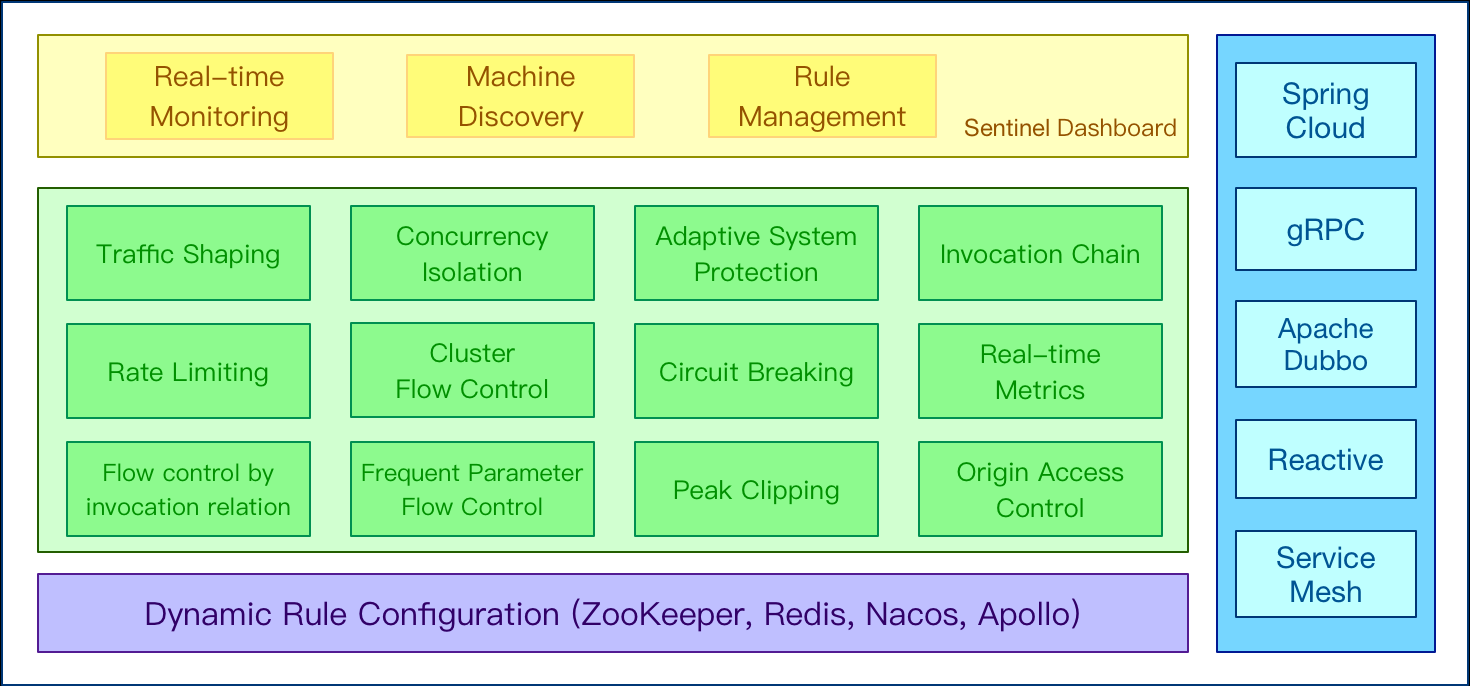
Sentinel 是阿里巴巴开源的面向分布式服务架构的流量治理组件,以流量为切入点,从流量控制、熔断降级、系统负载保护等多个维度保护服务的稳定性。
- GitHub:
https://github.com/alibaba/Sentinel - 最新稳定版:1.8.10(2025 年发布)
- 定位:替代已停止维护的 Hystrix,成为 Spring Cloud Alibaba 生态核心组件
发展历史
随着微服务的流行,服务和服务之间的稳定性变得越来越重要。Sentinel 是面向分布式、多语言异构化服务架构的流量治理组件,主要以流量为切入点,从流量路由、流量控制、流量整形、熔断降级、系统自适应过载保护、热点流量防护等多个维度来帮助开发者保障微服务的稳定性。
- 2012 年,Sentinel 诞生,主要功能为入口流量控制。
- 2013-2017 年,Sentinel 在阿里巴巴集团内部迅速发展,成为基础技术模块,覆盖了所有的核心场景。Sentinel 也因此积累了大量的流量归整场景以及生产实践。
- 2018 年,Sentinel 开源,并持续演进。
- 2019 年,Sentinel 朝着多语言扩展的方向不断探索,推出 C++ 原生版本,同时针对 Service Mesh 场景也推出了 Envoy 集群流量控制支持,以解决 Service Mesh 架构下多语言限流的问题。
- 2020 年,推出 Sentinel Go 版本,继续朝着云原生方向演进。
- 2021 年,Sentinel 正在朝着 2.0 云原生高可用决策中心组件进行演进;同时推出了 Sentinel Rust 原生版本。同时我们也在 Rust 社区进行了 Envoy WASM extension 及 eBPF extension 等场景探索。
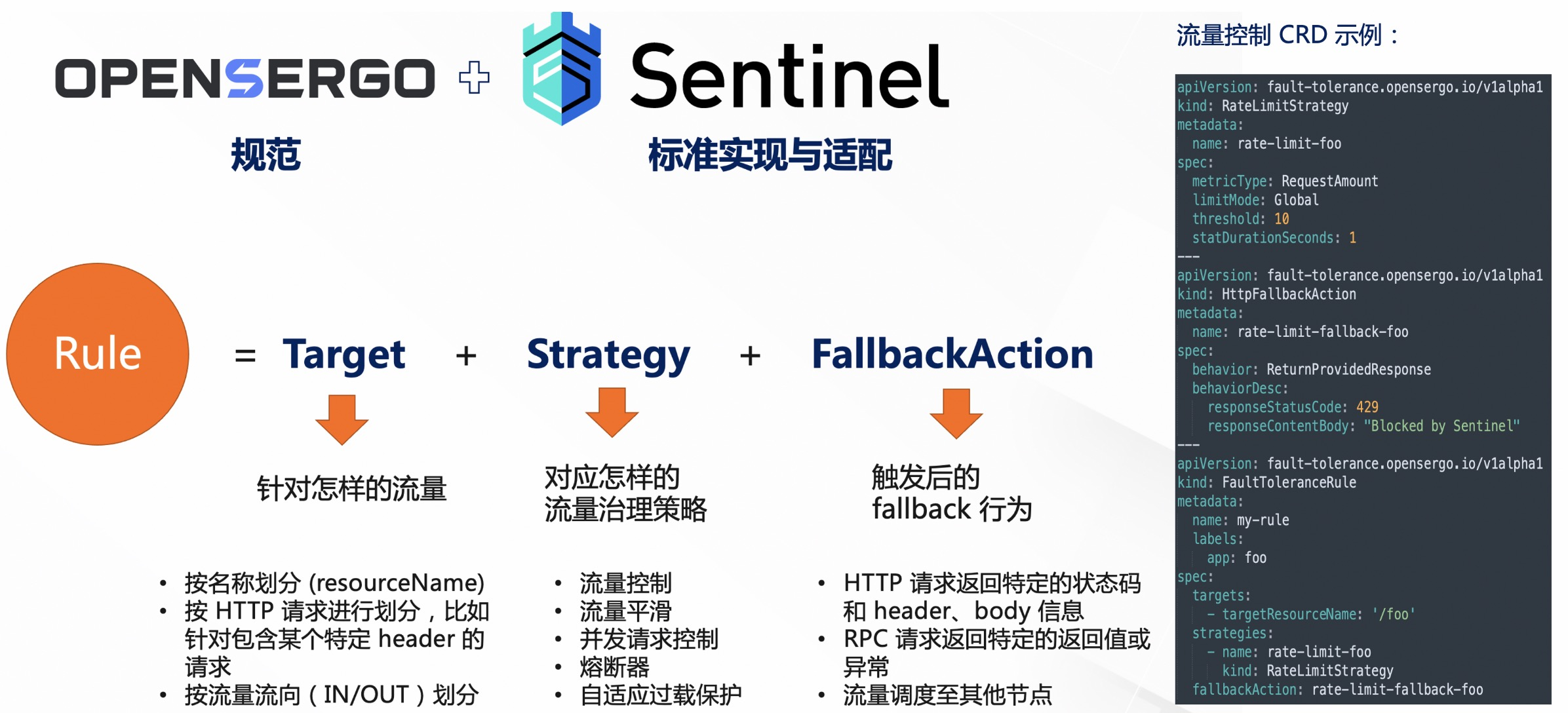
- 2022 年,Sentinel 品牌升级为流量治理,领域涵盖流量路由/调度、流量染色、流控降级、过载保护/实例摘除等;同时社区将流量治理相关标准抽出到 OpenSergo 标准中,Sentinel 作为流量治理标准实现。
核心概念
| 概念 | 说明 | 类比 |
|---|---|---|
| Resource(资源) | Sentinel 保护的对象,可以是一个方法、一个接口、一段代码 | “门” |
| Rule(规则) | 作用在资源上的保护策略(限流规则、熔断规则等) | “门禁规则” |
| Slot Chain(插槽链) | 核心处理链,每个请求经过一系列 Slot 完成统计和检查 | “安检流水线” |
| Entry(入口) | 每次资源访问的上下文对象,承载统计和调用链信息 | “安检单” |
| Node(节点) | 统计数据的载体,记录 QPS、线程数、响应时间等指标 | “统计台账” |
Sentinel vs Hystrix vs Resilience4j
| 维度 | Sentinel | Hystrix | Resilience4j |
|---|---|---|---|
| 限流 | 支持(QPS/线程数/热点参数/关联链路) | 不支持 | 基础支持 |
| 熔断策略 | 慢调用比例/异常比例/异常数 | 异常比例 | 慢调用/异常 |
| 系统自适应 | 支持(基于 Load1/RT/线程数/入口QPS) | 不支持 | 不支持 |
| 实时监控 | Dashboard 控制台 | Dashboard(app已弃用) | Actuator |
| 规则动态推送 | 支持(Nacos/Zookeeper/Apollo) | 不支持 | 不支持 |
| 维护状态 | 活跃维护 | 停止维护(2018) | 活跃维护 |
| 扩展性 | Slot Chain 可插拔 | 命令模式 | 函数式组合 |
1.2 快速入门
1.2.1 Maven 依赖
<!-- 核心库 -->
<dependency>
    <groupId>com.alibaba.csp</groupId>
    <artifactId>sentinel-core</artifactId>
    <version>1.8.10</version>
</dependency>

<!-- 注解支持 -->
<dependency>
    <groupId>com.alibaba.csp</groupId>
    <artifactId>sentinel-annotation-aspectj</artifactId>
    <version>1.8.10</version>
</dependency>

<!-- 控制台通信 -->
<dependency>
    <groupId>com.alibaba.csp</groupId>
    <artifactId>sentinel-transport-simple-http</artifactId>
    <version>1.8.10</version>
</dependency>
1.2.2 编码式使用
public class SentinelQuickStart {

    public static void main(String[] args) {
        // 1. 定义流控规则
        initFlowRules();

        // 2. 模拟高频请求
        for (int i = 0; i < 20; i++) {
            doBusiness();
        }
    }

    private static void doBusiness() {
        // 3. 使用 SphU.entry 包裹资源访问
        try (Entry entry = SphU.entry("doBusiness")) {
            System.out.println("业务执行成功: " + System.currentTimeMillis());
        } catch (BlockException e) {
            System.out.println("被限流: " + e.getClass().getSimpleName());
        }
    }

    private static void initFlowRules() {
        FlowRule rule = new FlowRule();
        rule.setResource("doBusiness");
        rule.setGrade(RuleConstant.FLOW_GRADE_QPS);
        rule.setCount(10); // 每秒最多 10 个请求
        rule.setLimitApp("default");
        rule.setControlBehavior(RuleConstant.CONTROL_BEHAVIOR_DEFAULT); // 直接拒绝

        FlowRuleManager.loadRules(Collections.singletonList(rule));
    }
}
1.2.3 注解式使用(推荐)
@Service
public class OrderService {

    /**
     * @SentinelResource 同时定义资源名与降级/限流后的处理逻辑
     */
    @SentinelResource(
        value = "createOrder",
        blockHandler = "createOrderBlockHandler",       // 限流/熔断后的处理
        blockHandlerClass = OrderBlockHandler.class,     // 可指定外部类
        fallback = "createOrderFallback"                 // 异常时的兜底
    )
    public Order createOrder(OrderRequest request) {
        // 正常业务逻辑
        return orderMapper.insert(request.toOrder());
    }

    /** blockHandler 方法签名必须与原方法一致,末尾多一个 BlockException 参数 */
    public Order createOrderBlockHandler(OrderRequest request, BlockException ex) {
        log.warn("订单创建被限流/熔断, resource={}", ex.getRule() != null ? ex.getRule().getResource() : "unknown");
        return Order.degraded("系统繁忙,请稍后重试");
    }

    /** fallback 方法签名必须与原方法一致,末尾多一个 Throwable 参数 */
    public Order createOrderFallback(OrderRequest request, Throwable ex) {
        log.error("订单创建异常", ex);
        return Order.degraded("创建失败,请稍后重试");
    }
}
blockHandler vs fallback 区别
blockHandler:处理BlockException(限流、熔断、系统保护触发)fallback:处理业务代码抛出的其他异常(BlockException除外)- 两者可同时配置,优先级:blockHandler > fallback
1.3 核心功能详解
1.3.1 流量控制(Flow Control)
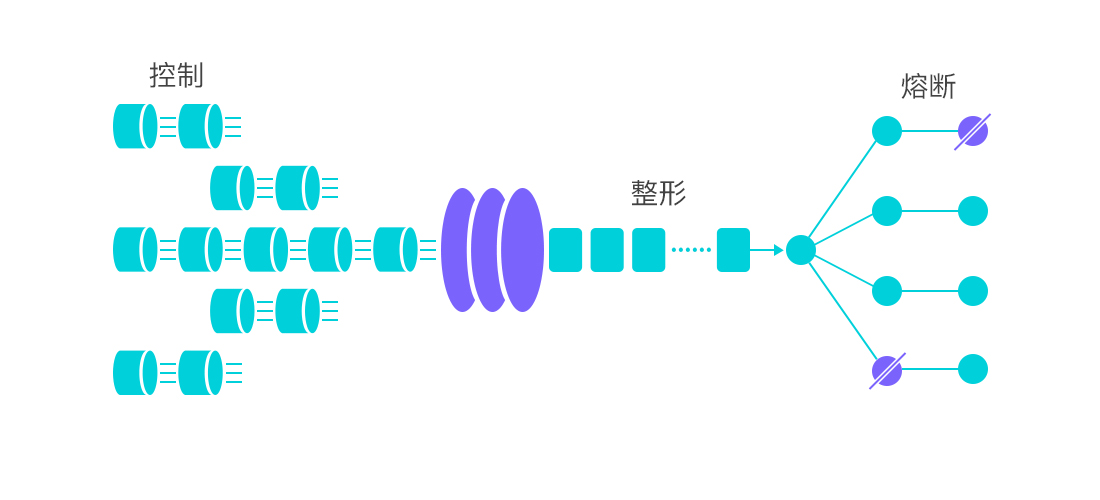
流量控制是 Sentinel 最基础的功能,用于限制资源的访问频率。
阈值类型
| 类型 | 说明 | 适用场景 |
|---|---|---|
| QPS | 每秒请求数 | 接口级粗粒度限流 |
| 并发线程数 | 同时执行的线程数 | 保护慢调用资源(如数据库) |
流控模式
| 模式 | 说明 | 典型场景 |
|---|---|---|
| 直接 | 资源自身达到阈值时限流 | 接口直接限流 |
| 关联 | 关联资源达到阈值时,限流自身 | 写接口限流保护读接口 |
| 链路 | 只有从指定入口进来的流量才计数 | API 网关 vs 内部调用区分 |
关联限流示例:当 createOrder(写)的 QPS 达到阈值时,限制 queryOrder(读):
流量入口 → queryOrder (被限流)
         → createOrder (触发限流)
流控效果
| 效果 | 说明 | 算法 | 适用场景 |
|---|---|---|---|
| 快速失败 | 超出阈值直接拒绝 | 滑动窗口 | 默认,大多数接口 |
| Warm Up(冷启动) | 阈值经预热期逐渐升高 | 令牌桶(冷启动因子=3) | 需要预热的系统(DB连接池) |
| 匀速排队 | 请求匀速通过,多余排队等待 | 漏桶 | 消息队列、批量处理 |
代码配置示例:
private static void initFlowRules() {
    // 规则1:QPS 直接快速失败
    FlowRule directRule = new FlowRule();
    directRule.setResource("queryOrder");
    directRule.setGrade(RuleConstant.FLOW_GRADE_QPS);
    directRule.setCount(100);
    directRule.setControlBehavior(RuleConstant.CONTROL_BEHAVIOR_DEFAULT);

    // 规则2:Warm Up 冷启动(初始阈值 = 100/3 ≈ 33,10秒后达到100)
    FlowRule warmUpRule = new FlowRule();
    warmUpRule.setResource("expensiveQuery");
    warmUpRule.setGrade(RuleConstant.FLOW_GRADE_QPS);
    warmUpRule.setCount(100);
    warmUpRule.setControlBehavior(RuleConstant.CONTROL_BEHAVIOR_WARM_UP);
    warmUpRule.setWarmUpPeriodSec(10);

    // 规则3:匀速排队(每秒100个,超时等待最长2000ms)
    FlowRule queueRule = new FlowRule();
    queueRule.setResource("batchProcess");
    queueRule.setGrade(RuleConstant.FLOW_GRADE_QPS);
    queueRule.setCount(100);
    queueRule.setControlBehavior(RuleConstant.CONTROL_BEHAVIOR_RATE_LIMITER);
    queueRule.setMaxQueueingTimeMs(2000);

    FlowRuleManager.loadRules(Arrays.asList(directRule, warmUpRule, queueRule));
}
1.3.2 熔断降级(Circuit Breaking)
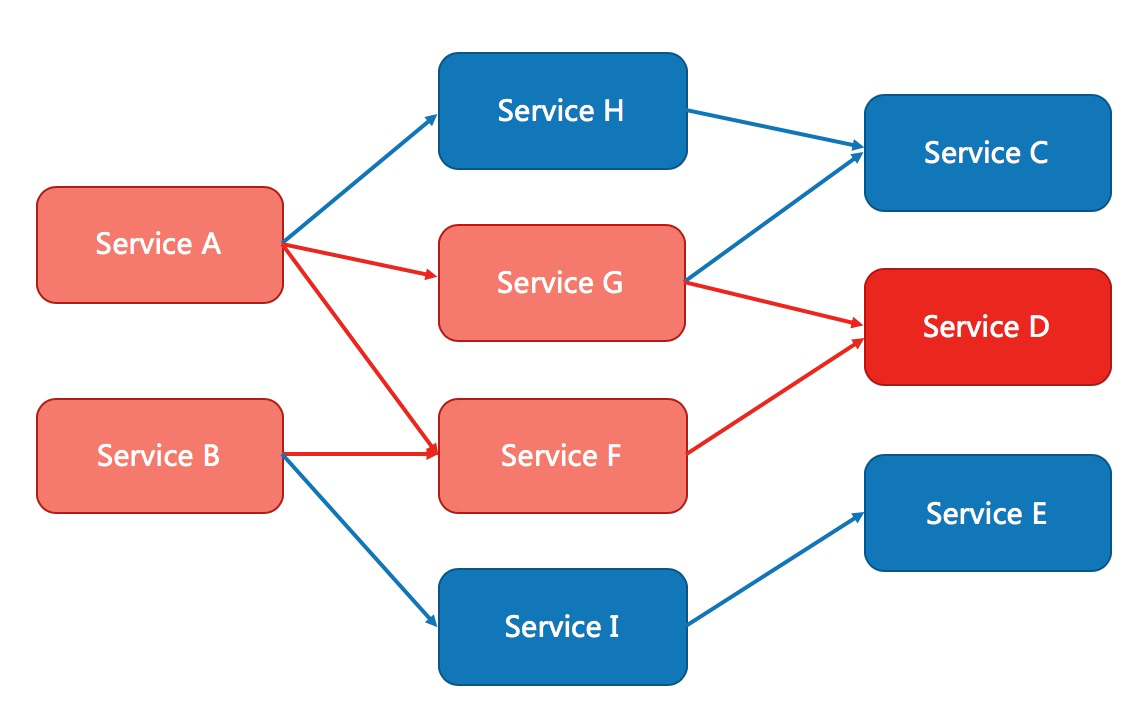
当资源调用不稳定(响应慢、异常率高)时,熔断器会切断调用,防止故障扩散。
三种熔断策略
| 策略 | 触发条件 | 适用场景 |
|---|---|---|
| 慢调用比例 | 慢调用比例 ≥ 阈值 | 对响应时间敏感的场景 |
| 异常比例 | 异常比例 ≥ 阈值 | 调用第三方/下游服务 |
| 异常数 | 异常数 ≥ 阈值 | 对异常零容忍的核心链路 |
慢调用比例熔断参数详解
最大 RT (maxRT):  超过此值视为"慢调用"(如 500ms)
比例阈值:         慢调用占比达到此值触发熔断(如 0.5 = 50%)
熔断时长:         熔断持续时间(如 10s)
最小请求数:       触发熔断的最小请求数(如 5),避免样本不足误判
统计时长:         统计窗口(默认 1000ms)
熔断器状态机
                    满足触发条件
    ┌──────────┐ ──────────────→ ┌──────────┐
    │  CLOSED  │                 │   OPEN   │
    │ (正常放行) │                 │ (熔断拒绝) │
    └──────────┘                 └──────────┘
         ↑                             │
         │                    等待熔断时长
         │                             │
         │                             ▼
         │                    ┌──────────────┐
         │      探测成功        │ HALF-OPEN    │
         └──────────────────── │ (半开,放行1个) │
                              └──────────────┘
                                     │
                              探测失败
                                     │
                                     ▼
                              ┌──────────┐
                              │   OPEN   │
                              └──────────┘
代码配置示例:
private static void initDegradeRules() {
    // 策略1:慢调用比例熔断
    DegradeRule slowCallRule = new DegradeRule();
    slowCallRule.setResource("rpcService");
    slowCallRule.setGrade(CircuitBreakerStrategy.SLOW_REQUEST_RATIO.getType());
    slowCallRule.setCount(500);       // 最大 RT: 500ms
    slowCallRule.setSlowRatioThreshold(0.5);  // 慢调用比例阈值: 50%
    slowCallRule.setTimeWindow(10);   // 熔断时长: 10s
    slowCallRule.setMinRequestAmount(5);      // 最小请求数: 5
    slowCallRule.setStatIntervalMs(1000);     // 统计窗口: 1s

    // 策略2:异常比例熔断
    DegradeRule exceptionRatioRule = new DegradeRule();
    exceptionRatioRule.setResource("rpcService");
    exceptionRatioRule.setGrade(CircuitBreakerStrategy.ERROR_RATIO.getType());
    exceptionRatioRule.setCount(0.5);   // 异常比例阈值: 50%
    exceptionRatioRule.setTimeWindow(15); // 熔断时长: 15s
    exceptionRatioRule.setMinRequestAmount(5);

    // 策略3:异常数熔断
    DegradeRule exceptionCountRule = new DegradeRule();
    exceptionCountRule.setResource("paymentService");
    exceptionCountRule.setGrade(CircuitBreakerStrategy.ERROR_COUNT.getType());
    exceptionCountRule.setCount(5);     // 异常数阈值: 5
    exceptionCountRule.setTimeWindow(20); // 熔断时长: 20s

    DegradeRuleManager.loadRules(Arrays.asList(slowCallRule, exceptionRatioRule, exceptionCountRule));
}
1.3.3 系统自适应保护
Sentinel 独有的能力——根据系统整体负载动态限流,而非单个资源维度。
四大维度
| 维度 | 说明 | 适用场景 |
|---|---|---|
| Load1 | Linux 系统 1 分钟平均负载 | 防止 CPU 过载 |
| CPU 使用率 | CPU 使用率阈值 | 快速响应 CPU 压力 |
| 平均 RT | 所有入口流量的平均响应时间 | 防止整体响应变慢 |
| 入口 QPS | 所有入口流量的总 QPS | 系统级总量控制 |
| 并发线程数 | 所有入口流量的并发线程数 | 防止线程耗尽 |
// 系统自适应保护规则(通常只需配置 1~2 项)
SystemRule rule = new SystemRule();
rule.setHighestCpuUsage(0.8);   // CPU 使用率 > 80% 触发
rule.setAvgRt(100);             // 平均 RT > 100ms 触发
rule.setMaxThread(500);         // 并发线程数 > 500 触发
rule.setQps(5000);              // 入口总 QPS > 5000 触发
SystemRuleManager.loadRules(Collections.singletonList(rule));
核心思想:Sentinel 系统自适应限流借鉴 TCP BBR 拥塞控制算法的思想,在系统接近饱和时主动降低吞吐,避免雪崩。
1.3.4 热点参数限流
针对请求中的特定参数值进行差异化限流。
@SentinelResource(value = "queryOrder", blockHandler = "queryOrderBlockHandler")
public Order queryOrder(@RequestParam Long orderId, @RequestParam String userId) {
    return orderMapper.selectById(orderId);
}
// 热点参数限流规则
ParamFlowRule rule = new ParamFlowRule("queryOrder")
    .setParamIdx(0)            // 对第 0 个参数(orderId)限流
    .setGrade(RuleConstant.FLOW_GRADE_QPS)
    .setCount(10);             // 每个 orderId 每秒最多 10 次

// 对特定参数值设置例外阈值
ParamFlowItem item = new ParamFlowItem();
item.setObject("10086");       // orderId=10086 是大客户,放宽到 100
item.setClassType(String.class.getName());
item.setCount(100);
rule.setParamFlowItemList(Collections.singletonList(item));

ParamFlowRuleManager.loadRules(Collections.singletonList(rule));
1.4 Sentinel Dashboard 部署与使用
1.4.1 下载与启动
# 下载最新版 Dashboard
wget https://github.com/alibaba/Sentinel/releases/download/1.8.10/sentinel-dashboard-1.8.10.jar

# 启动(默认端口 8080)
java -Dserver.port=8080 \
     -Dcsp.sentinel.dashboard.server=localhost:8080 \
     -Dproject.name=sentinel-dashboard \
     -jar sentinel-dashboard-1.8.10.jar
- 访问地址:
http://localhost:8080 - 默认账号:
sentinel/sentinel
1.4.2 应用接入 Dashboard
# application.yml
spring:
  cloud:
    sentinel:
      transport:
        dashboard: localhost:8080
        port: 8719          # 客户端与 Dashboard 通信端口
      eager: true            # 应用启动即上报(无需首次访问)
1.4.3 Dashboard 功能概览
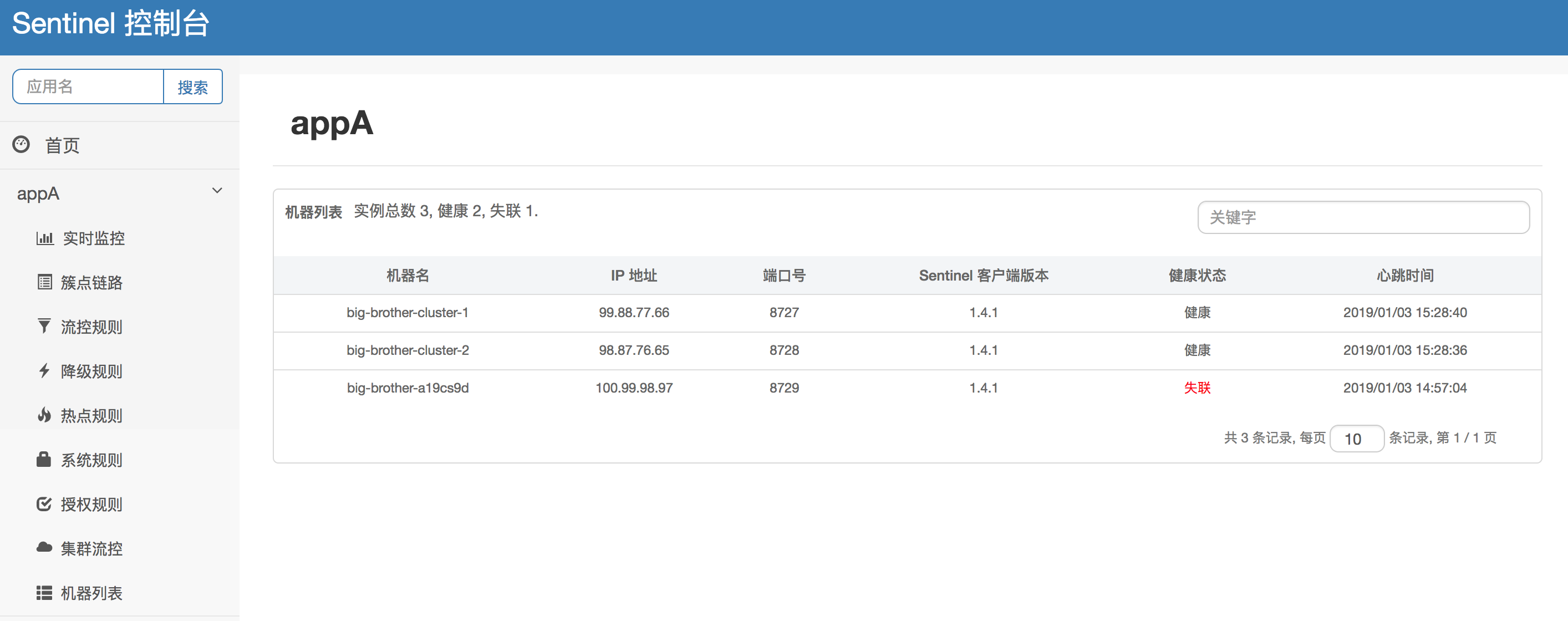
| 功能 | 说明 |
|---|---|
| 实时监控 | 查看各资源的 QPS、响应时间、线程数实时曲线 |
| 簇点链路 | 展示资源的调用关系树 |
| 流控规则 | 可视化配置流量控制规则 |
| 熔断规则 | 可视化配置熔断降级规则 |
| 热点规则 | 可视化配置热点参数限流 |
| 系统规则 | 可视化配置系统自适应保护 |
注意:Dashboard 默认将规则存储在内存中,应用重启后规则丢失。生产环境必须配合规则持久化方案(见 1.6 节)。
1.5 Spring Cloud Alibaba 整合
1.5.1 完整依赖
<dependencyManagement>
    <dependencies>
        <dependency>
            <groupId>com.alibaba.cloud</groupId>
            <artifactId>spring-cloud-alibaba-dependencies</artifactId>
            <version>2023.0.3.2</version>
            <type>pom</type>
            <scope>import</scope>
        </dependency>
    </dependencies>
</dependencyManagement>

<dependencies>
    <!-- Spring Cloud Alibaba Sentinel Starter -->
    <dependency>
        <groupId>com.alibaba.cloud</groupId>
        <artifactId>spring-cloud-starter-alibaba-sentinel</artifactId>
    </dependency>

    <!-- Sentinel 对 Feign/OpenFeign 的支持 -->
    <dependency>
        <groupId>com.alibaba.cloud</groupId>
        <artifactId>spring-cloud-starter-alibaba-sentinel</artifactId>
    </dependency>

    <!-- Sentinel 对 Spring WebFlux 的支持(可选) -->
    <dependency>
        <groupId>com.alibaba.csp</groupId>
        <artifactId>sentinel-spring-webflux-adapter</artifactId>
    </dependency>
</dependencies>
1.5.2 完整配置
spring:
  cloud:
    sentinel:
      transport:
        dashboard: localhost:8080
        port: 8719
      eager: true
      # 自定义资源名前缀过滤(可选)
      filter:
        enabled: true
        url-patterns: /**
      datasource:           # 规则持久化配置(见 1.6)
        flow:
          nacos:
            server-addr: localhost:8848
            dataId: ${spring.application.name}-flow-rules
            groupId: SENTINEL_GROUP
            rule-type: flow
        degrade:
          nacos:
            server-addr: localhost:8848
            dataId: ${spring.application.name}-degrade-rules
            groupId: SENTINEL_GROUP
            rule-type: degrade

# 启用 Feign 对 Sentinel 的集成
feign:
  sentinel:
    enabled: true
1.5.3 OpenFeign 整合 Sentinel
@FeignClient(
    name = "user-service",
    fallbackFactory = UserServiceFallbackFactory.class  // 推荐使用 Factory 获取异常信息
)
public interface UserService {

    @GetMapping("/users/{id}")
    User getUser(@PathVariable("id") Long id);
}

@Component
public class UserServiceFallbackFactory implements FallbackFactory<UserService> {

    @Override
    public UserService create(Throwable cause) {
        return new UserService() {
            @Override
            public User getUser(Long id) {
                // 区分限流熔断 vs 业务异常
                if (cause instanceof BlockException) {
                    return User.degraded("服务限流/熔断,请稍后重试");
                }
                return User.degraded("服务调用失败: " + cause.getMessage());
            }
        };
    }
}
1.5.4 RestTemplate 整合 Sentinel
@Configuration
public class RestConfig {

    @Bean
    @LoadBalanced
    @SentinelRestTemplate(
        blockHandler = "handleBlock",
        blockHandlerClass = RestTemplateHandler.class,
        fallback = "handleFallback",
        fallbackClass = RestTemplateHandler.class
    )
    public RestTemplate restTemplate() {
        return new RestTemplate();
    }
}

public class RestTemplateHandler {
    public static ClientHttpResponse handleBlock(HttpRequest request, byte[] body,
                                                  ClientHttpRequestExecution execution, BlockException ex) {
        return new SentinelClientHttpResponse("{\"code\":-1,\"msg\":\"请求被限流\"}");
    }

    public static ClientHttpResponse handleFallback(HttpRequest request, byte[] body,
                                                     ClientHttpRequestExecution execution, Throwable ex) {
        return new SentinelClientHttpResponse("{\"code\":-1,\"msg\":\"请求异常\"}");
    }
}
1.6 规则持久化(Nacos)
问题背景
| 方式 | 规则存储 | 重启后 | 是否推荐 |
|---|---|---|---|
| 编码式 | 内存 | 丢失 | 仅测试 |
| Dashboard 推送 | 应用内存 | 丢失 | 仅开发 |
| Nacos 持久化 | Nacos 配置中心 | 保留 | 生产推荐 |
Nacos 配置示例
在 Nacos 中创建配置:
- Data ID:
order-service-flow-rules - Group:
SENTINEL_GROUP - 配置格式:
JSON
[
  {
    "resource": "createOrder",
    "limitApp": "default",
    "grade": 1,
    "count": 100,
    "strategy": 0,
    "controlBehavior": 0,
    "clusterMode": false
  },
  {
    "resource": "queryOrder",
    "limitApp": "default",
    "grade": 1,
    "count": 200,
    "strategy": 0,
    "controlBehavior": 0,
    "clusterMode": false
  }
]
字段说明:
grade=1表示 QPS 限流;strategy=0表示直接模式;controlBehavior=0表示快速失败。
推送模式对比
| 模式 | 原理 | 优点 | 缺点 |
|---|---|---|---|
| 拉模式(pull) | 客户端定时轮询文件 | 简单 | 延迟高、非实时 |
| 推模式(push) | Nacos/Zookeeper 监听变更推送到客户端 | 实时 | 需中间件 |
| 原始模式 | Dashboard API 推送到内存 | 零配置 | 不持久 |
生产环境推荐 Nacos 推模式:规则存储在 Nacos,Dashboard 修改规则后同步到 Nacos,各应用节点监听 Nacos 变更并实时更新。
第二部分:核心原理与源码解析
2.1 责任链模式与 Slot Chain
整体架构
Sentinel 的核心设计是责任链模式(Chain of Responsibility)。每次资源访问(SphU.entry())都会创建一个 Entry,然后依次经过一系列 ProcessorSlot 完成统计和检查。
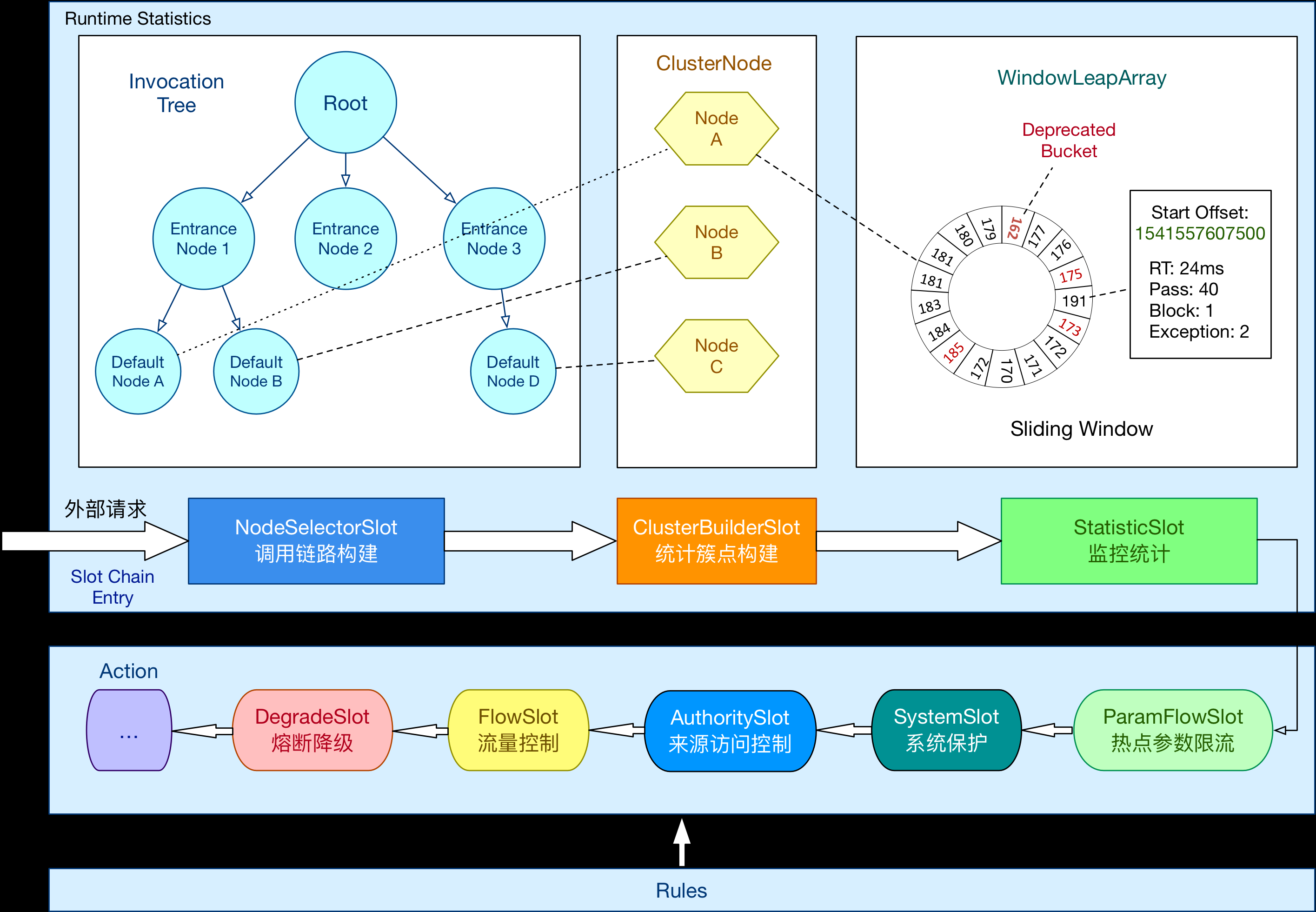
请求进入
  │
  ▼
┌─────────────────────────────────────────────────────────────────┐
│                     ProcessorSlotChain                          │
│                                                                 │
│  NodeSelectorSlot → ClusterBuilderSlot → StatisticsSlot         │
│       │                │                  │                     │
│  构建调用链路树      构建集群节点         统计 QPS/RT/线程数      │
│                                                                 │
│  → ParamFlowSlot → FlowSlot → DegradeSlot → SystemSlot         │
│       │              │           │             │                │
│  热点参数检查      流控检查     熔断检查     系统自适应检查       │
│                                                                 │
│  → AuthoritySlot → LogSlot → Entry                              │
│       │             │         │                                 │
│  黑白名单检查     日志记录   放行执行                              │
└─────────────────────────────────────────────────────────────────┘
Slot 职责详解
| Slot 顺序 | 名称 | 职责 |
|---|---|---|
| 1 | NodeSelectorSlot |
构建 Context 维度的调用树,为每个资源创建 DefaultNode |
| 2 | ClusterBuilderSlot |
构建集群维度的统计节点 ClusterNode,存储资源全局统计 |
| 3 | StatisticsSlot |
核心统计 Slot,记录 QPS、RT、线程数等指标到滑动窗口 |
| 4 | ParamFlowSlot |
热点参数限流检查 |
| 5 | FlowSlot |
流量控制检查(读取 FlowRule) |
| 6 | DegradeSlot |
熔断降级检查(读取 DegradeRule) |
| 7 | SystemSlot |
系统自适应保护检查(读取 SystemRule) |
| 8 | AuthoritySlot |
黑白名单授权检查 |
| 9 | LogSlot |
记录限流/熔断日志 |
 |
源码入口:SphU.entry()
// SphU.java — 用户调用入口
public static Entry entry(String name) throws BlockException {
    return Env.sph.entry(name, EntryType.IN);
}

// CtSph.java — 核心实现
private Entry entryWithPriority(ResourceWrapper resourceWrapper, Context context,
                                 EntryType type, int count, Object... args) throws BlockException {

    // 1. 构建 Slot Chain(每个资源对应一条 Chain,通过缓存复用)
    ProcessorSlot<Object> chain = lookProcessChain(resourceWrapper);

    // 2. 创建 Entry
    Entry entry = new CtEntry(chain, context, resourceWrapper, type);

    // 3. 执行 Slot Chain — 责任链入口
    try {
        chain.entry(context, resourceWrapper, null, count, args);
    } catch (BlockException e) {
        entry.exit(0);  // 清理
        throw e;        // 向上抛出限流/熔断异常
    }

    return entry;
}
Slot Chain 构建:DefaultSlotChainBuilder
public class DefaultSlotChainBuilder implements SlotChainBuilder {

    @Override
    public ProcessorSlotChain build() {
        ProcessorSlotChain chain = new DefaultProcessorSlotChain();

        // SPI 机制加载所有 Slot,按 @SpiOrder 注解排序
        List<ProcessorSlot> sortedSlots = loadSortedSlots();

        for (ProcessorSlot slot : sortedSlots) {
            // 构建单向链表
            chain.addLast((AbstractLinkedProcessorSlot<?>) slot);
        }

        return chain;
    }
}
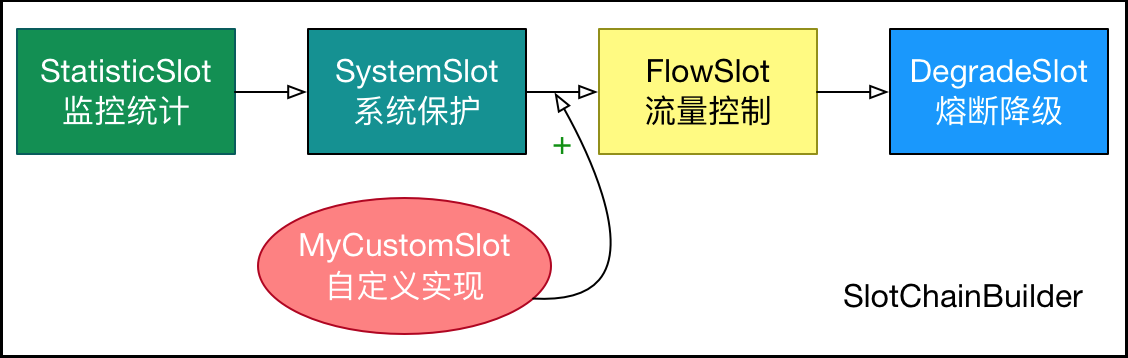
扩展点:通过 SPI 机制(
META-INF/services/com.alibaba.csp.sentinel.slot.SlotChainBuilder)可实现自定义 Slot,无需修改源码。
2.2 滑动窗口统计算法
为什么需要滑动窗口
传统固定窗口算法存在临界点问题:窗口切换瞬间可能出现 2 倍阈值的流量。滑动窗口通过将大窗口切分为多个小格子,每次统计覆盖最近 N 个格子,实现更平滑的统计。
Sentinel 的实现:LeapArray
时间轴 ──────────────────────────────────────→

  窗口0(0~500ms)  窗口1(500~1000ms)  窗口2(1000~1500ms)
 ┌──────────────┐ ┌──────────────┐ ┌──────────────┐
 │  QPS=60      │ │  QPS=45      │ │  QPS=80      │
 └──────────────┘ └──────────────┘ └──────────────┘
       ↑                                    ↑
       │         当前时间点 t=1200ms          │
       │                                    │
       └──── 统计范围:窗口1 + 窗口2 ─────────┘
              合计 QPS = 45 + 80 = 125(仅统计未过期的窗口)
核心数据结构
public class LeapArray<T> {

    private final int sampleCount;        // 窗口格子数(默认 2)
    private final int intervalInMs;       // 总窗口时长(默认 1000ms)
    private final AtomicReferenceArray<WindowWrap<T>> array;  // 环形数组

    /**
     * 根据当前时间获取对应的窗口
     * Sentinel 将 1 秒拆分为 2 个 500ms 的窗口(sampleCount=2)
     */
    public WindowWrap<T> currentWindow(long timeMillis) {
        int idx = calculateTimeIdx(timeMillis);   // 计算数组下标
        long windowStart = calculateWindowStart(timeMillis);  // 计算窗口起始时间

        while (true) {
            WindowWrap<T> old = array.get(idx);
            if (old == null) {
                // 新窗口:创建并 CAS 写入
                WindowWrap<T> wrap = new WindowWrap<>(windowLengthInMs, windowStart, newEmptyBucket());
                if (array.compareAndSet(idx, null, wrap)) {
                    return wrap;
                }
            } else if (windowStart == old.windowStart()) {
                // 当前窗口:直接返回
                return old;
            } else if (windowStart > old.windowStart()) {
                // 窗口已过期:重置统计值并更新起始时间
                if (updateLock.tryLock()) {
                    try {
                        resetWindowTo(old, windowStart);
                        return old;
                    } finally {
                        updateLock.unlock();
                    }
                }
            }
            // 其他线程在更新,让出 CPU 重试
            Thread.yield();
        }
    }
}
统计流程
请求进入
  │
  ▼
StatisticsSlot.entry()
  │
  ▼
rollingCounterInSecond.pass()  ← 获取当前窗口的 pass 计数
  │
  ▼
LeapArray.currentWindow(timeMillis)  ← 定位到时间格子
  │
  ▼
WindowWrap.value().addPass()  ← 在对应格子的计数器 +1
关键设计:Sentinel 默认将 1 秒拆分为 2 个 500ms 窗口。当请求到达时,先定位到当前时间对应的窗口,若窗口已过期则重置。通过
AtomicReferenceArray+ CAS 实现无锁并发更新。
2.3 限流算法实现
Sentinel 支持四种流控行为,底层对应不同的 TrafficShapingController 实现:
算法对比总览
| 流控效果 | 实现类 | 算法 | 核心思想 |
|---|---|---|---|
| 快速失败 | DefaultController |
滑动窗口统计 | 超阈值直接拒绝 |
| Warm Up | WarmUpController |
令牌桶(冷启动) | 预热期内阈值逐步提升 |
| 匀速排队 | RateLimitController |
漏桶 | 请求匀速通过,超时等待 |
| Warm Up + 排队 | WarmUpRateLimitController |
令牌桶 + 漏桶 | 预热 + 匀速组合 |
2.3.1 快速失败:DefaultController
public class DefaultController implements TrafficShapingController {

    @Override
    public boolean canPass(Node node, int acquireCount, boolean prioritized) {
        // 获取当前已通过的 QPS(滑动窗口统计)
        int currentCount = (int) node.passQps();

        // 判断:已通过 + 本次请求 是否超过阈值
        if (currentCount + acquireCount > count) {
            return false;  // 超阈值,拒绝
        }

        // CAS 更新计数
        for (int i = 0; i < RETRY_TIMES; i++) {
            int oldCount = (int) node.passQps();
            int newCount = oldCount + acquireCount;
            if (newCount > count) {
                return false;
            }
            if (node.rollingPassCount().compareAndSet(oldCount, newCount)) {
                return true;  // CAS 成功,放行
            }
        }
        return false;
    }
}
2.3.2 Warm Up(冷启动):WarmUpController
核心思想:系统刚启动时处理能力未达到最优(如 JIT 未编译、连接池未预热),阈值应从低开始逐步提升。
public class WarmUpController implements TrafficShapingController {

    private double count;              // 最终阈值(QPS)
    private int coldFactor;            // 冷启动因子(默认 3)
    private int warningToken = 20;     // 警戒线令牌数
    private int maxToken;              // 最大令牌数
    private double slope;              // 令牌消耗斜率
    private AtomicLong storedTokens;   // 当前令牌数
    private AtomicLong lastFilledTime; // 上次填充时间

    @Override
    public boolean canPass(Node node, int acquireCount, boolean prioritized) {
        long passQps = (long) node.passQps();
        long previousQps = (long) node.previousPassQps();

        // 1. 根据上一秒 QPS 调整令牌数
        syncToken(previousQps);

        long restToken = storedTokens.get();

        // 2. 令牌数超过警戒线 → 系统处于冷启动阶段,严格限流
        if (restToken >= warningToken) {
            // 当前 QPS 超过冷启动允许值 → 拒绝
            long aboveToken = restToken - warningToken;
            double warningQps = aboveToken * slope + count;  // 冷启动允许的 QPS
            if (passQps + acquireCount <= warningQps) {
                return true;
            }
            return false;
        }
        // 3. 令牌数低于警戒线 → 系统已预热,正常限流
        if (passQps + acquireCount <= count) {
            return true;
        }
        return false;
    }

    private void syncToken(long passQps) {
        long currentTime = TimeUtil.currentTimeMillis();
        long oldTime = lastFilledTime.get();
        // 每秒填充一次令牌
        if (currentTime - oldTime > 1000) {
            // 令牌补充:count - passQps(上一秒消耗的令牌)
            long newValue = maxToken - passQps;
            storedTokens.set(newValue);
            lastFilledTime.set(currentTime);
        }
    }
}
冷启动阈值变化曲线:
QPS阈值
  │
  │           ╭────────────────  最终阈值 count (如 100)
  │         ╱
  │       ╱
  │     ╱    ← 预热期:阈值逐步提升
  │   ╱
  │  ╱
  │╱────────────────  初始阈值 count/coldFactor (如 33)
  └──────────────────────────────→ 时间
   启动    预热期结束(约 warmUpPeriodSec)
2.3.3 匀速排队:ThrottlingController
核心思想:漏桶算法——请求匀速通过,多余请求排队等待(超时则拒绝)。
public class ThrottlingController implements TrafficShapingController {

    private final double count;              // QPS 阈值
    private final int maxQueueingTimeMs;     // 最大排队等待时间
    private final AtomicLong latestPassedTime = new AtomicLong(-1);

    @Override
    public boolean canPass(Node node, int acquireCount, boolean prioritized) {
        // 若当前 QPS 远低于阈值,直接放行
        if (passQps.get() + acquireCount <= count) {
            return true;
        }

        // 计算本次请求需要等待的时间(漏桶:每个请求间隔 = 1000ms / count)
        long currentTime = TimeUtil.currentTimeMillis();
        long expectedTime = currentTime;  // 默认立即通过

        // 计算排队位置:前一个通过时间 + 本次间隔
        long lastTime = latestPassedTime.get();
        long expectedRt = lastTime + (long)(acquireCount * 1000.0 / count);

        if (expectedRt <= currentTime) {
            // 不需要排队,立即通过
            latestPassedTime.set(currentTime);
            return true;
        }

        // 需要排队:计算等待时间
        long estimatedTime = expectedRt - currentTime;
        if (estimatedTime > maxQueueingTimeMs) {
            // 超过最大排队时间,拒绝
            return false;
        }

        // CAS 更新最新通过时间
        long oldTime = latestPassedTime.addAndGet(estimatedTime);
        try {
            // 等待
            if (oldTime - estimatedTime > 0) {
                Thread.sleep(oldTime - currentTime);
            }
            return true;
        } catch (InterruptedException e) {
            return false;
        }
    }
}
注意:匀速排队模式会阻塞线程等待,不适合 QPS 阈值过高的场景(如 >1000),否则大量线程阻塞会导致线程池耗尽。
2.4 熔断器状态机
三种状态与转换条件
| 当前状态 | 事件 | 目标状态 | 说明 |
|---|---|---|---|
| CLOSED | 满足熔断触发条件 | OPEN | 正常 → 熔断 |
| OPEN | 经过 timeWindow 时长 |
HALF_OPEN | 熔断 → 半开(探测) |
| HALF_OPEN | 探测请求成功 | CLOSED | 恢复正常 |
| HALF_OPEN | 探测请求失败 | OPEN | 重新熔断 |
源码实现:CircuitBreaker
public abstract class AbstractCircuitBreaker implements CircuitBreaker {

    protected final DegradeRule rule;
    protected AtomicInteger state;                    // 状态:0=CLOSED, 1=OPEN, 2=HALF_OPEN
    protected long nextRetryTimestamp;                // 下次重试时间(半开探测时间)

    @Override
    public boolean tryPass(Context context) {
        // 模板方法
        if (currentState() == STATE_CLOSED) {
            return true;  // 关闭状态,直接放行
        }
        if (currentState() == STATE_OPEN) {
            // 熔断状态:检查是否到半开时间
            return retryTimeoutArrived() && fromOpenToHalfOpen(context);
        }
        return false;  // 半开状态:只允许一个探测请求
    }

    /**
     * 请求结束后回调,判断是否需要更新熔断器状态
     */
    @Override
    public void onRequestComplete(Context context, double rt, Exception ex) {
        // 子类实现具体的策略判断
        // SlowRequestCircuitBreaker:检查 RT 是否超过阈值
        // ExceptionRatioCircuitBreaker:检查异常比例
        // ExceptionCountCircuitBreaker:检查异常数
    }

    protected boolean fromOpenToHalfOpen(Context context) {
        // CAS: OPEN → HALF_OPEN
        if (state.compareAndSet(STATE_OPEN, STATE_HALF_OPEN)) {
            // 注册探测回调:探测成功则 CLOSED,失败则重新 OPEN
            context.getCurEntry().whenTerminate(entry -> {
                if (entry.getBlockError() != null) {
                    // 探测被限流或异常 → 重新 OPEN
                    fromHalfOpenToOpen(1.0);
                } else {
                    // 探测成功 → CLOSED
                    fromHalfOpenToClose();
                }
            });
            return true;
        }
        return false;
    }
}
慢调用比例熔断器:SlowRequestCircuitBreaker
public class SlowRequestCircuitBreaker extends AbstractCircuitBreaker {

    private final long maxRT;              // 慢调用阈值(ms)
    private final double slowRatioThreshold; // 慢调用比例阈值

    @Override
    public void onRequestComplete(Context context, double rt, Exception ex) {
        // 1. 获取滑动窗口统计
        SimpleLeapArray<SlowRequestCounter> slidingWindow = ...;

        SlowRequestCounter counter = slidingWindow.currentWindow().value();

        // 2. 更新统计:总请求数 +1,慢调用数 +1(if RT > maxRT)
        counter.totalCount++;
        if (rt > maxRT) {
            counter.slowCount++;
        }

        // 3. 计算慢调用比例
        double slowRatio = (double) counter.slowCount / counter.totalCount;

        // 4. 达到阈值 + 满足最小请求数 → 触发熔断
        if (counter.totalCount >= minRequestAmount
            && slowRatio >= slowRatioThreshold) {
            // CLOSED → OPEN
            fromClosedToOpen();
        }
    }
}
完整状态转换流程
请求完成时回调 onRequestComplete()
         │
         ▼
    ┌────────────┐     满足触发条件      ┌────────────┐
    │  CLOSED    │ ──────────────────→ │   OPEN     │
    │ 正常统计    │                      │ 拒绝请求    │
    └────────────┘                      └─────┬──────┘
         ↑                                    │
         │                          经过 timeWindow
         │                                    │
         │                                    ▼
         │                          ┌──────────────┐
         │    探测成功               │  HALF_OPEN   │
         └───────────────────────── │ 放行 1 个请求 │
                                    └──────┬───────┘
                                           │
                                   探测失败(超时/异常)
                                           │
                                           ▼
                                    ┌────────────┐
                                    │   OPEN     │
                                     │ 重新熔断    │
                                     └────────────┘
第三部分:大厂高频面试题
3.1 基础概念类
Q1:什么是 Sentinel?它解决了什么问题?
答:Sentinel 是阿里巴巴开源的流量治理组件,以流量为切入点,从限流、熔断降级、系统负载保护三个维度保障微服务稳定性。
解决的核心问题:
- 流量突增:大促、秒杀场景下流量超过系统承载能力
- 服务雪崩:下游服务故障导致上游线程阻塞,连锁扩散
- 系统过载:CPU、内存、线程等资源耗尽导致整体不可用
Q2:Sentinel 的核心概念有哪些?
答:
- Resource(资源):被保护的对象,可以是方法、接口、代码块
- Rule(规则):作用在资源上的保护策略
- Slot Chain(插槽链):责任链模式的处理流水线
- Entry(入口):每次资源访问的上下文
- Node(节点):统计数据载体,分
DefaultNode(调用链路维度)和ClusterNode(资源全局维度)
Q3:限流和熔断降级有什么区别?
答:
| 维度 | 限流 | 熔断降级 |
|---|---|---|
| 触发条件 | 请求量/并发量超过阈值 | 响应慢、异常率高、异常数多 |
| 目的 | 保护自身不被压垮 | 防止下游故障扩散到自身 |
| 生效时间 | 持续生效(只要超阈值就拦) | 间歇生效(熔断→半开→恢复) |
| 关注对象 | 流量大小 | 调用质量(RT/异常率) |
| 类比 | 水坝闸门控制流量 | 电路保险丝断电保护 |
Q4:Sentinel 的流控模式有哪几种?
答:
- 直接:资源自身达到阈值时限流
- 关联:关联资源达到阈值时限流自身(典型:写限流保护读)
- 链路:只有从指定入口进来的流量才被统计和限流
Q5:QPS 限流和线程数限流有什么区别?分别适用什么场景?
答:
- QPS 限流:限制每秒请求数,适合接口级粗粒度防护。如:API 网关限制某接口 QPS ≤ 1000
- 线程数限流:限制并发执行线程数,适合保护慢调用资源。如:数据库查询接口,即使 QPS 不高但每个请求耗时长,并发线程可能过多导致连接池耗尽
关键区别:QPS 关注"频率",线程数关注"同时处理量"。一个接口 QPS=10 但每个请求耗时 5 秒,则峰值线程数=50;若限流线程数=20,则实际 QPS 被压到 4。
3.2 原理实现类
Q6:Sentinel 的核心架构是什么?请描述 Slot Chain 的工作流程。
答:Sentinel 核心是责任链模式,每次资源访问经过一系列 ProcessorSlot:
NodeSelectorSlot → ClusterBuilderSlot → StatisticsSlot
→ ParamFlowSlot → FlowSlot → DegradeSlot → SystemSlot
→ AuthoritySlot → LogSlot
流程:
NodeSelectorSlot:构建调用链路树,创建DefaultNodeClusterBuilderSlot:构建资源级ClusterNode,存储全局统计StatisticsSlot:在滑动窗口中记录 QPS、RT、线程数ParamFlowSlot:热点参数限流检查FlowSlot:流控规则检查(读取FlowRule)DegradeSlot:熔断降级检查(读取DegradeRule)SystemSlot:系统自适应检查AuthoritySlot:黑白名单检查LogSlot:记录限流/熔断日志
Q7:Sentinel 如何实现滑动窗口统计?
答:
Sentinel 通过 LeapArray 实现滑动窗口:
- 将 1 秒(默认)拆分为 2 个 500ms 的时间窗口
- 使用
AtomicReferenceArray(环形数组)存储窗口 - 请求到达时,根据当前时间计算窗口下标:
idx = (timeMillis / windowLength) % sampleCount - 若窗口已过期(当前时间 > 窗口起始时间 + 窗口长度),重置窗口统计值
- 通过 CAS 无锁更新保证并发安全
关键:统计时累加所有未过期窗口的数据,实现"滑动"效果。
Q8:Sentinel 的快速失败、Warm Up、匀速排队分别用了什么算法?
答:
| 流控效果 | 算法 | 实现类 | 原理 |
|---|---|---|---|
| 快速失败 | 滑动窗口 | DefaultController |
统计当前 QPS,超阈值 CAS 拒绝 |
| Warm Up | 令牌桶(冷启动) | WarmUpController |
初始阈值=count/3,逐步提升到 count |
| 匀速排队 | 漏桶 | ThrottlingController |
每个请求间隔=1000/count,超时等待 |
Q9:Sentinel 的熔断器有几种状态?状态如何转换?
答:三种状态——CLOSED(关闭)、OPEN(打开/熔断)、HALF_OPEN(半开):
CLOSED --满足触发条件--> OPEN --经过timeWindow--> HALF_OPEN
                                                      │
                                              ┌───────┴───────┐
                                         探测成功          探测失败
                                              │               │
                                              ▼               ▼
                                          CLOSED          OPEN(重新计时)
Q10:Sentinel 的 blockHandler 和 fallback 有什么区别?
答:
blockHandler:处理BlockException,即 Sentinel 限流、熔断、系统保护触发时调用fallback:处理业务代码抛出的其他异常(BlockException不触发 fallback)- 优先级:
blockHandler>fallback(如果同时配置,限流时走 blockHandler,业务异常时走 fallback) - 方法签名:
blockHandler末尾参数是BlockException;fallback末尾参数是Throwable
Q11:Sentinel 如何实现规则动态推送?
答:通过 ReadableDataSource / WritableDataSource 抽象:
- 拉模式:
FileRefreshableDataSource定时轮询文件变更 - 推模式:
NacosDataSource/ZookeeperDataSource监听配置中心变更,实时推送
Spring Cloud Alibaba 通过 spring.cloud.sentinel.datasource 配置自动装配数据源。
Q12:Sentinel 的 Slot Chain 如何扩展?能否自定义 Slot?
答:可以,通过 SPI 机制:
- 实现
AbstractLinkedProcessorSlot接口 - 使用
@SpiOrder注解指定执行顺序 - 在
META-INF/services/下注册
@SpiOrder(-1000)  // 数字越小优先级越高
public class CustomSlot extends AbstractLinkedProcessorSlot<DefaultNode> {
    @Override
    public void entry(Context context, ResourceWrapper resourceWrapper, Node node, int count, Object... args)
            throws Throwable {
        // 自定义逻辑
        fireEntry(context, resourceWrapper, node, count, args);  // 传递给下一个 Slot
    }
}
3.3 场景设计类
Q13:设计一个秒杀系统的限流方案,如何用 Sentinel 实现?
答:
分层限流策略:
| 层级 | 限流手段 | 阈值 |
|---|---|---|
| 网关层 | Sentinel Gateway 限流 | 全局 QPS ≤ 10000 |
| 接口层 | @SentinelResource QPS 限流 |
单接口 QPS ≤ 1000 |
| 用户层 | 热点参数限流(按 userId) | 单用户 QPS ≤ 1 |
| 系统层 | 系统自适应保护 | CPU ≤ 80% |
// 秒杀接口:QPS 限流 + 热点参数限流(按 userId)
@SentinelResource(value = "seckill", blockHandler = "seckillBlockHandler")
public Result seckill(@RequestParam Long goodsId, @RequestParam Long userId) {
    // 扣库存逻辑
}

// 热点参数规则:每个 userId 每秒限 1 次
ParamFlowRule rule = new ParamFlowRule("seckill")
    .setParamIdx(1)    // 第 1 个参数 userId
    .setGrade(RuleConstant.FLOW_GRADE_QPS)
    .setCount(1);
Q14:如果下游服务变慢,如何用 Sentinel 防止服务雪崩?
答:
三道防线:
- 线程数限流:限制调用下游的并发线程数,防止线程池耗尽
- 慢调用熔断:RT 超过阈值且比例过高时熔断,快速失败
- 降级兜底:熔断后返回降级数据,而非抛异常
// 1. 线程数限流:保护自身线程池
FlowRule threadRule = new FlowRule();
threadRule.setResource("callUserService");
threadRule.setGrade(RuleConstant.FLOW_GRADE_THREAD);
threadRule.setCount(50);  // 最多 50 个并发线程

// 2. 慢调用熔断:RT > 500ms 且比例 > 50% 时熔断 10s
DegradeRule slowRule = new DegradeRule();
slowRule.setResource("callUserService");
slowRule.setGrade(CircuitBreakerStrategy.SLOW_REQUEST_RATIO.getType());
slowRule.setCount(500);              // 最大 RT
slowRule.setSlowRatioThreshold(0.5); // 慢调用比例 50%
slowRule.setTimeWindow(10);          // 熔断 10s
slowRule.setMinRequestAmount(5);     // 最小 5 个请求
Q15:如何实现分布式限流(集群限流)?
答:
Sentinel 提供集群限流模式:
- Token Server:独立部署或嵌入部署,维护全局令牌
- Token Client:各应用节点作为客户端,向 Token Server 申请令牌
- 每个请求先向 Token Server 申请令牌,成功才放行
// 集群限流规则
FlowRule rule = new FlowRule();
rule.setResource("globalAPI");
rule.setGrade(RuleConstant.FLOW_GRADE_QPS);
rule.setCount(1000);           // 全局 QPS 1000
rule.setClusterMode(true);     // 启用集群限流
rule.setClusterConfig(new ClusterFlowConfig()
    .setThresholdType(ClusterRuleConstant.FLOW_THRESHOLD_GLOBAL));
权衡:集群限流精度高但引入网络开销和单点风险;单机限流无依赖但总阈值 = 单机阈值 × 节点数,不够精确。生产中常用"单机兜底 + 集群精确"的组合方案。
Q16:Sentinel 的规则在多节点间如何保证一致性?
答:
- 推模式(推荐):规则存储在 Nacos/Zookeeper,所有节点监听同一配置,配置中心保证最终一致性
- 集群限流:Token Server 维护全局令牌,各 Client 通过通信保证一致性
- 注意:规则推送有秒级延迟,极端情况下短暂不一致可接受
3.4 对比分析类
Q17:Sentinel 和 Hystrix 的核心区别是什么?为什么选 Sentinel?
答:
| 维度 | Sentinel | Hystrix |
|---|---|---|
| 限流 | 支持(QPS/线程数/热点参数) | 不支持 |
| 熔断 | 慢调用比例/异常比例/异常数 | 仅异常比例 |
| 系统保护 | 支持(自适应) | 不支持 |
| 控制台 | 实时 Dashboard,规则可视化 | Hystrix Dashboard(仅监控) |
| 规则持久化 | 支持(Nacos/ZK) | 不支持 |
| 扩展性 | SPI 插拔式 Slot Chain | 命令模式 |
| 维护状态 | 活跃 | 停止维护 |
选 Sentinel 的理由:功能更全面(有限流)、控制台更好用、规则可持久化、生态活跃。
Q18:Sentinel 和 Resilience4j 如何选择?
答:
| 维度 | Sentinel | Resilience4j |
|---|---|---|
| 语言 | Java(面向 OOP) | Java 8+(函数式) |
| 限流 | 丰富(QPS/线程/热点/集群) | 基础(RateLimiter) |
| 熔断 | 3 种策略 | 2 种(慢调用/异常) |
| 系统保护 | 支持 | 不支持 |
| 控制台 | Dashboard | Actuator |
| 学习曲线 | 中等 | 陡峭(函数式) |
| 适用场景 | Spring Cloud Alibaba 生态 | Spring Boot / 反应式 |
选择建议:
- 用 Spring Cloud Alibaba → Sentinel
- 用 Spring Boot + WebFlux → Resilience4j
- 需要丰富限流策略 → Sentinel
- 偏好函数式风格 → Resilience4j
Q19:令牌桶和漏桶有什么区别?Sentinel 用了哪种?
答:
| 维度 | 令牌桶 | 漏桶 |
|---|---|---|
| 原理 | 按速率生成令牌,请求消耗令牌 | 请求进入桶,按恒定速率漏出 |
| 突发流量 | 允许(桶中令牌可累积) | 不允许(匀速输出) |
| Sentinel 对应 | Warm Up 冷启动 | 匀速排队 |
Sentinel 两种都用了:
- Warm Up(冷启动)基于令牌桶思想
- 匀速排队基于漏桶思想
- 快速失败基于滑动窗口统计(非令牌桶/漏桶)
Q20:Sentinel 集群限流和 Redis + Lua 限流有什么区别?
答:
| 维度 | Sentinel 集群限流 | Redis + Lua |
|---|---|---|
| 实现 | Token Server 模式 | Redis 原子操作 |
| 性能 | Token Server 内存操作,性能高 | 每次请求一次 Redis 往返 |
| 可用性 | Token Server 单点(需集群) | Redis 集群高可用 |
| 功能 | 限流+熔断+系统保护 | 仅限流 |
| 适用场景 | Spring Cloud Alibaba 生态 | 通用,不限框架 |
第四部分:高并发场景问题解决方案
4.1 秒杀场景:突发流量削峰
问题分析
秒杀场景特点:瞬间流量可达平时的 100~1000 倍,但实际库存有限(如 100 件),大部分请求注定失败。核心诉求是快速拒绝无效请求,保护系统不被冲垮。
解决方案:四层漏斗模型
                    ┌──────────────────┐
   瞬间 10万请求     │   CDN + 前端层     │
  ─────────────────→│  按钮防抖+验证码    │  过滤 80%(8万)
                    └────────┬─────────┘
                             │ 2万请求
                    ┌────────▼─────────┐
                    │   网关层限流       │
                    │  Sentinel Gateway │  过滤 70%(1.4万)
                    └────────┬─────────┘
                             │ 6000请求
                    ┌────────▼─────────┐
                    │  接口层限流        │
                    │  QPS限流+热点参数  │  过滤 80%(4800)
                    └────────┬─────────┘
                             │ 1200请求
                    ┌────────▼─────────┐
                    │  缓存+MQ异步下单   │
                    │  Redis预减库存     │  过滤 90%(1080)
                    └────────┬─────────┘
                             │ 120请求
                    ┌────────▼─────────┐
                    │  数据库扣库存       │
                    └──────────────────┘
Sentinel 代码实现
@RestController
public class SeckillController {

    /**
     * 秒杀接口 —— 多维度限流
     */
    @SentinelResource(value = "seckill", blockHandler = "seckillBlockHandler")
    public Result seckill(@RequestParam Long goodsId, @RequestParam Long userId) {
        // 1. Redis 预减库存
        Long stock = redisTemplate.opsForValue().decrement("seckill:stock:" + goodsId);
        if (stock != null && stock < 0) {
            redisTemplate.opsForValue().increment("seckill:stock:" + goodsId); // 回滚
            return Result.fail("商品已售罄");
        }

        // 2. 发送 MQ 异步创建订单
        rabbitTemplate.convertAndSend("seckill.exchange", "seckill.order",
                new SeckillMessage(goodsId, userId));

        return Result.success("秒杀成功,订单创建中");
    }

    /** 限流兜底 */
    public Result seckillBlockHandler(Long goodsId, Long userId, BlockException ex) {
        if (ex instanceof ParamFlowException) {
            return Result.fail("操作太频繁,请稍后再试");
        }
        return Result.fail("当前排队人数过多,请稍后再试");
    }
}
/**
 * 秒杀限流规则配置
 */
@Configuration
public class SeckillSentinelConfig {

    @PostConstruct
    public void init() {
        // 规则1:接口级 QPS 限流 —— 快速失败
        FlowRule apiRule = new FlowRule();
        apiRule.setResource("seckill");
        apiRule.setGrade(RuleConstant.FLOW_GRADE_QPS);
        apiRule.setCount(2000);  // 接口最大 QPS 2000
        apiRule.setControlBehavior(RuleConstant.CONTROL_BEHAVIOR_DEFAULT);

        // 规则2:热点参数限流 —— 单用户每秒限 1 次
        ParamFlowRule userRule = new ParamFlowRule("seckill")
            .setParamIdx(1)  // userId 参数
            .setGrade(RuleConstant.FLOW_GRADE_QPS)
            .setCount(1);

        // 规则3:热点参数限流 —— 单商品每秒限 500 次(防刷单)
        ParamFlowRule goodsRule = new ParamFlowRule("seckill")
            .setParamIdx(0)  // goodsId 参数
            .setGrade(RuleConstant.FLOW_GRADE_QPS)
            .setCount(500);

        // 规则4:慢调用熔断 —— RT > 200ms 且比例 > 30% 时熔断 5s
        DegradeRule slowRule = new DegradeRule();
        slowRule.setResource("seckill");
        slowRule.setGrade(CircuitBreakerStrategy.SLOW_REQUEST_RATIO.getType());
        slowRule.setCount(200);
        slowRule.setSlowRatioThreshold(0.3);
        slowRule.setTimeWindow(5);
        slowRule.setMinRequestAmount(10);

        // 规则5:系统自适应保护 —— CPU > 80% 时全局限流
        SystemRule sysRule = new SystemRule();
        sysRule.setHighestCpuUsage(0.8);

        FlowRuleManager.loadRules(Collections.singletonList(apiRule));
        ParamFlowRuleManager.loadRules(Arrays.asList(userRule, goodsRule));
        DegradeRuleManager.loadRules(Collections.singletonList(slowRule));
        SystemRuleManager.loadRules(Collections.singletonList(sysRule));
    }
}
关键设计要点
| 要点 | 说明 |
|---|---|
| 分层过滤 | 每层只放过合理比例的请求,层层递减 |
| 快速失败 | 秒杀场景用"快速失败"而非"匀速排队",避免线程阻塞 |
| 热点参数 | 按 userId 限流防刷单,按 goodsId 限流防热点 |
| MQ 异步 | 通过 MQ 将同步下单转为异步,削峰填谷 |
| 降级兜底 | 限流后返回友好提示,而非抛异常 |
4.2 服务雪崩防护
问题分析
服务雪崩指下游服务故障(变慢或不可用)导致上游线程阻塞,进而扩散到整个调用链,最终全部不可用。
Service A → Service B → Service C (故障:响应超时)
     ↑           ↑
  线程阻塞     线程阻塞
     ↑
  线程池耗尽 → A 不可用 → A 的上游也不可用 → 雪崩
解决方案:熔断 + 线程隔离 + 降级
@Service
public class OrderFacadeService {

    @Autowired
    private UserFeignClient userFeignClient;     // 调用用户服务
    @Autowired
    private InventoryFeignClient inventoryFeignClient; // 调用库存服务

    /**
     * 创建订单 —— 多个下游调用,每个都需熔断保护
     */
    @SentinelResource(value = "createOrder", blockHandler = "createOrderBlockHandler")
    public OrderResult createOrder(OrderRequest request) {
        // 1. 查用户信息(可能慢)
        UserInfo user = queryUserInfo(request.getUserId());

        // 2. 扣库存(可能失败)
        boolean deducted = deductInventory(request.getGoodsId(), request.getQuantity());

        // 3. 创建订单
        if (deducted) {
            return orderMapper.insert(request.toOrder());
        }
        return OrderResult.fail("库存不足");
    }

    /** 调用用户服务 —— 独立资源名,独立熔断规则 */
    @SentinelResource(value = "callUserService", blockHandler = "userFallback")
    private UserInfo queryUserInfo(Long userId) {
        return userFeignClient.getUser(userId);
    }

    /** 调用库存服务 —— 独立资源名,独立熔断规则 */
    @SentinelResource(value = "callInventoryService", blockHandler = "inventoryFallback")
    private boolean deductInventory(Long goodsId, int quantity) {
        return inventoryFeignClient.deduct(goodsId, quantity);
    }

    // --- 降级方法 ---

    public UserInfo userFallback(Long userId, BlockException ex) {
        log.warn("用户服务熔断,返回降级数据, userId={}", userId);
        return UserInfo.defaultUser();  // 返回默认用户信息
    }

    public boolean inventoryFallback(Long goodsId, int quantity, BlockException ex) {
        log.warn("库存服务熔断,返回降级结果, goodsId={}", goodsId);
        return false;  // 降级:库存扣减失败
    }

    public OrderResult createOrderBlockHandler(OrderRequest request, BlockException ex) {
        log.warn("订单创建被限流");
        return OrderResult.degraded("系统繁忙,请稍后重试");
    }
}
熔断规则配置
@PostConstruct
public void initDegradeRules() {
    List<DegradeRule> rules = new ArrayList<>();

    // 用户服务:慢调用熔断(RT > 300ms, 比例 > 50%, 熔断 10s)
    DegradeRule userRule = new DegradeRule();
    userRule.setResource("callUserService");
    userRule.setGrade(CircuitBreakerStrategy.SLOW_REQUEST_RATIO.getType());
    userRule.setCount(300);
    userRule.setSlowRatioThreshold(0.5);
    userRule.setTimeWindow(10);
    userRule.setMinRequestAmount(5);
    rules.add(userRule);

    // 用户服务:异常比例熔断(异常率 > 50%, 熔断 15s)
    DegradeRule userExceptionRule = new DegradeRule();
    userExceptionRule.setResource("callUserService");
    userExceptionRule.setGrade(CircuitBreakerStrategy.ERROR_RATIO.getType());
    userExceptionRule.setCount(0.5);
    userExceptionRule.setTimeWindow(15);
    userExceptionRule.setMinRequestAmount(5);
    rules.add(userExceptionRule);

    // 库存服务:异常数熔断(5个异常即熔断)
    DegradeRule inventoryRule = new DegradeRule();
    inventoryRule.setResource("callInventoryService");
    inventoryRule.setGrade(CircuitBreakerStrategy.ERROR_COUNT.getType());
    inventoryRule.setCount(5);
    inventoryRule.setTimeWindow(20);
    rules.add(inventoryRule);

    // 线程数限流:每个下游调用最多 50 个并发线程
    FlowRule userThreadRule = new FlowRule();
    userThreadRule.setResource("callUserService");
    userThreadRule.setGrade(RuleConstant.FLOW_GRADE_THREAD);
    userThreadRule.setCount(50);

    FlowRule inventoryThreadRule = new FlowRule();
    inventoryThreadRule.setResource("callInventoryService");
    inventoryThreadRule.setGrade(RuleConstant.FLOW_GRADE_THREAD);
    inventoryThreadRule.setCount(30);

    DegradeRuleManager.loadRules(rules);
    FlowRuleManager.loadRules(Arrays.asList(userThreadRule, inventoryThreadRule));
}
雪崩防护策略总结
| 防护层 | 手段 | 作用 |
|---|---|---|
| 线程隔离 | 线程数限流 | 防止调用下游的线程耗尽,波及自身 |
| 快速熔断 | 慢调用/异常熔断 | 下游异常时快速失败,不等待 |
| 降级兜底 | blockHandler 返回默认值 | 熔断后仍能返回可用结果 |
| 级联防护 | 每个下游调用独立资源名 | 故障隔离,不互相影响 |
4.3 突发流量应对:冷启动与匀速排队
问题分析
| 场景 | 特点 | 问题 |
|---|---|---|
| 系统刚启动 | JIT 未编译、连接池未预热 | 大流量涌入直接压垮 |
| 批处理任务 | 请求匀速到达,允许排队 | 快速失败浪费请求 |
| 消息消费 | 消息积压后瞬间消费 | 突发流量打崩下游 |
4.3.1 冷启动(Warm Up)保护系统启动
// 场景:系统刚发布,数据库连接池未预热,缓存未填充
// 直接放开 1000 QPS 会导致 DB 连接池耗尽

FlowRule warmUpRule = new FlowRule();
warmUpRule.setResource("queryProduct");
warmUpRule.setGrade(RuleConstant.FLOW_GRADE_QPS);
warmUpRule.setCount(1000);          // 最终阈值 1000 QPS
warmUpRule.setControlBehavior(RuleConstant.CONTROL_BEHAVIOR_WARM_UP);
warmUpRule.setWarmUpPeriodSec(30);  // 30 秒预热期

// 预热曲线:
// 0~10s:   阈值 ≈ 333 QPS (1000/3)
// 10~20s:  阈值 ≈ 666 QPS
// 20~30s:  阈值 ≈ 1000 QPS
// 30s+:    阈值 = 1000 QPS
4.3.2 匀速排队保护批处理下游
// 场景:消息队列消费者,每秒消费 100 条消息调用下游
// 下游处理能力 = 100 QPS,但不允许突发

FlowRule rateLimitRule = new FlowRule();
rateLimitRule.setResource("processMessage");
rateLimitRule.setGrade(RuleConstant.FLOW_GRADE_QPS);
rateLimitRule.setCount(100);          // 每秒 100 个
rateLimitRule.setControlBehavior(RuleConstant.CONTROL_BEHAVIOR_RATE_LIMITER);
rateLimitRule.setMaxQueueingTimeMs(5000);  // 最多排队 5 秒

// 效果:请求以 10ms 间隔匀速通过(1000ms / 100 = 10ms)
// 突发 500 个请求 → 100 个立即通过,400 个排队等待,最多等 5 秒
4.3.3 组合方案:Warm Up + 匀速排队
// 场景:大促刚开始,需要预热 + 匀速
FlowRule combinedRule = new FlowRule();
combinedRule.setResource("promotionAPI");
combinedRule.setGrade(RuleConstant.FLOW_GRADE_QPS);
combinedRule.setCount(500);
combinedRule.setControlBehavior(RuleConstant.CONTROL_BEHAVIOR_WARM_UP_RATE_LIMITER);
combinedRule.setWarmUpPeriodSec(20);
combinedRule.setMaxQueueingTimeMs(3000);
选型决策表
| 流控效果 | 适用场景 | 不适用场景 |
|---|---|---|
| 快速失败 | 秒杀、读多写少 | 不能丢请求的场景 |
| Warm Up | 系统启动、大促开始 | 持续高负载场景 |
| 匀速排队 | MQ 消费、批处理 | 要求低延迟的在线接口 |
| Warm Up + 排队 | 大促预热 + 削峰 | 高 QPS(>1000)场景 |
4.4 数据库连接保护
问题分析
数据库是最脆弱的环节:连接数有限(通常 50~200)、慢查询会长时间占用连接、并发过高导致连接池耗尽。
解决方案:线程数限流 + 慢调用熔断
@Service
public class OrderQueryService {

    @Autowired
    private JdbcTemplate jdbcTemplate;

    /**
     * 复杂查询接口 —— 可能产生慢 SQL
     * 用线程数限流保护数据库连接池
     */
    @SentinelResource(value = "complexQuery", blockHandler = "complexQueryBlockHandler")
    public List<Order> complexQuery(OrderQueryParam param) {
        // 模拟复杂 SQL
        return jdbcTemplate.query(
            "SELECT * FROM orders WHERE create_time > ? AND status = ? ORDER BY create_time DESC",
            new Object[]{param.getStartTime(), param.getStatus()},
            new OrderRowMapper()
        );
    }

    public List<Order> complexQueryBlockHandler(OrderQueryParam param, BlockException ex) {
        log.warn("复杂查询被限流,返回空列表");
        return Collections.emptyList();
    }
}
@PostConstruct
public void initDbProtectionRules() {
    List<FlowRule> flowRules = new ArrayList<>();

    // 规则1:线程数限流 —— 并发查询不超过 20(假设连接池大小 50,留 30 给其他业务)
    FlowRule threadRule = new FlowRule();
    threadRule.setResource("complexQuery");
    threadRule.setGrade(RuleConstant.FLOW_GRADE_THREAD);
    threadRule.setCount(20);
    flowRules.add(threadRule);

    // 规则2:QPS 限流 —— 每秒最多 100 次查询
    FlowRule qpsRule = new FlowRule();
    qpsRule.setResource("complexQuery");
    qpsRule.setGrade(RuleConstant.FLOW_GRADE_QPS);
    qpsRule.setCount(100);
    flowRules.add(qpsRule);

    FlowRuleManager.loadRules(flowRules);

    // 规则3:慢调用熔断 —— SQL 执行 > 1s 且比例 > 30% 时熔断 15s
    DegradeRule slowSqlRule = new DegradeRule();
    slowSqlRule.setResource("complexQuery");
    slowSqlRule.setGrade(CircuitBreakerStrategy.SLOW_REQUEST_RATIO.getType());
    slowSqlRule.setCount(1000);      // RT > 1000ms 视为慢查询
    slowSqlRule.setSlowRatioThreshold(0.3);
    slowSqlRule.setTimeWindow(15);
    slowSqlRule.setMinRequestAmount(5);
    DegradeRuleManager.loadRules(Collections.singletonList(slowSqlRule));
}
数据库保护策略矩阵
| 防护手段 | 阈值建议 | 作用 |
|---|---|---|
| 线程数限流 | ≤ 连接池大小 × 40% | 防止连接池耗尽 |
| QPS 限流 | 根据 DB TPS 测试结果 | 防止 DB 过载 |
| 慢查询熔断 | RT > 1s | 快速隔离慢 SQL |
| 异常比例熔断 | 异常率 > 50% | DB 故障时保护应用 |
最佳实践:线程数限流阈值 = 连接池大小 × 40%~60%,留出余量给其他业务和紧急操作。
4.5 网关层限流
问题分析
API 网关是所有请求的入口,需要在最外层拦截异常流量,防止其进入内部服务。
Spring Cloud Gateway + Sentinel 整合
<!-- 依赖 -->
<dependency>
    <groupId>com.alibaba.csp</groupId>
    <artifactId>sentinel-spring-cloud-gateway-adapter</artifactId>
    <version>1.8.10</version>
</dependency>
@Configuration
public class GatewaySentinelConfig {

    @Bean
    @Order(-1)
    public SentinelGatewayFilter sentinelGatewayFilter() {
        return new SentinelGatewayFilter();
    }

    @Bean
    @Order(-1)
    public SentinelGatewayBlockExceptionHandler sentinelBlockExceptionHandler() {
        return new SentinelGatewayBlockExceptionHandler();
    }

    @PostConstruct
    public void initGatewayRules() {
        Set<GatewayFlowRule> rules = new HashSet<>();

        // 规则1:API 分组限流 —— 所有 /api/** 路径总 QPS 5000
        rules.add(new GatewayFlowRule("api_group")
            .setResourceMode(SentinelGatewayConstants.RESOURCE_MODE_CUSTOM_API_NAME)
            .setCount(5000)
            .setIntervalSec(1));

        // 规则2:特定路由限流 —— /api/orders 每秒 1000
        rules.add(new GatewayFlowRule("order_route")
            .setCount(1000)
            .setIntervalSec(1));

        // 规则3:参数限流 —— 按 userId 限流,每用户每秒 10 次
        rules.add(new GatewayFlowRule("order_route")
            .setCount(10)
            .setIntervalSec(1)
            .setParamItem(new GatewayParamFlowItem()
                .setParseStrategy(SentinelGatewayConstants.PARAM_PARSE_STRATEGY_HEADER)
                .setFieldName("X-User-Id")));

        // 规则4:突发流量允许 —— 2 秒窗口,允许 2 倍突发
        rules.add(new GatewayFlowRule("order_route")
            .setCount(2000)
            .setIntervalSec(2)
            .setBurst(2000));  // 突发量

        GatewayRuleManager.loadRules(rules);
    }

    @PostConstruct
    public void initCustomApis() {
        // 定义 API 分组
        Set<ApiDefinition> definitions = new HashSet<>();
        ApiDefinition apiGroup = new ApiDefinition("api_group")
            .setPredicateItems(new HashSet<ApiPredicateItem>() {{
                add(new ApiPathPredicateItem()
                    .setMatchStrategy(SentinelGatewayConstants.URL_MATCH_STRATEGY_PREFIX)
                    .setPattern("/api/"));
            }});
        definitions.add(apiGroup);
        GatewayApiDefinitionManager.loadApiDefinitions(definitions);
    }
}
自定义限流响应
@Component
public class CustomBlockExceptionHandler implements BlockExceptionHandler {

    @Override
    public void handle(ServerWebExchange exchange, BlockException ex) {
        String body;
        if (ex instanceof ParamFlowException) {
            body = "{\"code\":429,\"msg\":\"请求过于频繁\"}";
        } else {
            body = "{\"code\":429,\"msg\":\"系统繁忙,请稍后重试\"}";
        }

        exchange.getResponse().setStatusCode(HttpStatus.TOO_MANY_REQUESTS);
        exchange.getResponse().getHeaders().setContentType(MediaType.APPLICATION_JSON);
        DataBuffer buffer = exchange.getResponse().bufferFactory().wrap(body.getBytes());
        exchange.getResponse().writeWith(Mono.just(buffer));
    }
}
网关限流策略表
| 限流维度 | 配置方式 | 场景 |
|---|---|---|
| 全局限流 | API 分组限流 | 保护整个系统总入口 |
| 路由限流 | 按路由 ID 限流 | 保护单个微服务 |
| 参数限流 | Header/URL 参数 | 按 userId/IP 限流 |
| 突发允许 | setBurst() |
允许短时突发流量 |
| 冷启动 | GatewayFlowRule + WarmUp | 网关冷启动保护 |
4.6 分布式限流
问题分析
单机限流的问题:假设有 5 个节点,单机限流 200 QPS,总流量可能达到 1000 QPS,超过系统实际承载能力(如 800 QPS)。
方案一:Sentinel 集群限流
// === Token Server 配置 ===

// Token Server 启动类
public class TokenServer {

    public static void main(String[] args) throws Exception {
        ClusterTokenServer tokenServer = new ClusterTokenServer(8720);  // 端口
        tokenServer.start();
    }
}

// === Token Client 配置(应用节点) ===

@Configuration
public class ClusterClientConfig {

    @PostConstruct
    public void init() {
        // 配置 Token Server 地址
        ClusterClientAssignProcessor.setServerAssignProperty(
            new TokenClientConfig()
                .setServerHost("10.0.0.1")
                .setServerPort(8720)
        );

        // 集群限流规则:全局 QPS 800
        FlowRule clusterRule = new FlowRule();
        clusterRule.setResource("globalAPI");
        clusterRule.setGrade(RuleConstant.FLOW_GRADE_QPS);
        clusterRule.setCount(800);
        clusterRule.setClusterMode(true);
        clusterRule.setClusterConfig(new ClusterFlowConfig()
            .setThresholdType(ClusterRuleConstant.FLOW_THRESHOLD_GLOBAL)
            .setFallbackToLocalWhenFail(true));  // Token Server 不可用时降级为单机限流

        FlowRuleManager.loadRules(Collections.singletonList(clusterRule));
    }
}
方案二:Redis + Lua 分布式限流(通用方案)
/**
 * Redis + Lua 滑动窗口限流
 * 适用于非 Spring Cloud Alibaba 生态
 */
@Component
public class RedisRateLimiter {

    @Autowired
    private StringRedisTemplate redisTemplate;

    private static final String LUA_SCRIPT =
        "local key = KEYS[1] " +
        "local limit = tonumber(ARGV[1]) " +
        "local window = tonumber(ARGV[2]) " +
        "local current = tonumber(redis.call('time')[1]) " +
        "local clearBefore = current - window " +
        "" +
        "-- 清除过期记录 " +
        "redis.call('zremrangebyscore', key, 0, clearBefore) " +
        "" +
        "-- 统计当前窗口内请求数 " +
        "local count = redis.call('zcard', key) " +
        "" +
        "if count < limit then " +
        "    redis.call('zadd', key, current, current) " +
        "    redis.call('expire', key, window) " +
        "    return 1 " +  -- 放行
        "else " +
        "    return 0 " +  -- 拒绝
        "end";

    private final DefaultRedisScript<Long> script = new DefaultRedisScript<>(LUA_SCRIPT, Long.class);

    public boolean tryAcquire(String resource, int limit, int windowSeconds) {
        String key = "rate_limit:" + resource;
        Long result = redisTemplate.execute(script, Collections.singletonList(key),
                String.valueOf(limit), String.valueOf(windowSeconds));
        return result != null && result == 1;
    }
}
// 使用示例:结合 AOP 自动限流
@Aspect
@Component
public class RateLimitAspect {

    @Autowired
    private RedisRateLimiter rateLimiter;

    @Around("@annotation(rateLimit)")
    public Object around(ProceedingJoinPoint point, RateLimit rateLimit) throws Throwable {
        String resource = rateLimit.resource();
        if (!rateLimiter.tryAcquire(resource, rateLimit.limit(), rateLimit.window())) {
            throw new RateLimitException("请求过于频繁,请稍后重试");
        }
        return point.proceed();
    }
}

@Target(ElementType.METHOD)
@Retention(RetentionPolicy.RUNTIME)
public @interface RateLimit {
    String resource();
    int limit() default 100;
    int window() default 1;
}
分布式限流方案对比
| 方案 | 精度 | 性能 | 可用性 | 复杂度 | 适用场景 |
|---|---|---|---|---|---|
| Sentinel 集群限流 | 高 | 高(内存) | 中(Token Server 单点) | 中 | SCA 生态 |
| Redis + Lua | 高 | 中(网络往返) | 高(Redis 集群) | 低 | 通用 |
| 网关 + 单机限流 | 低(粗略) | 极高 | 极高 | 低 | 简单场景 |
生产推荐:Sentinel 集群限流(精确)+ 单机限流兜底(Token Server 故障时降级)。
4.7 常见问题排查清单
问题1:规则不生效
| 可能原因 | 排查方法 | 解决方案 |
|---|---|---|
| 资源名不匹配 | 检查 @SentinelResource(value=...) 与规则中的 resource 是否一致 |
统一命名 |
| Context 未初始化 | Dashboard 中查看簇点链路是否有该资源 | 确保 eager: true 或首次请求已触发 |
| 规则未加载 | 检查 FlowRuleManager.getRules() 返回的规则列表 |
确认 Nacos 配置推送成功 |
| AOP 未生效 | 确认 sentinel-annotation-aspectj 依赖已引入 |
添加 @EnableAspectJAutoProxy |
问题2:限流阈值不准确
| 可能原因 | 排查方法 | 解决方案 |
|---|---|---|
| 滑动窗口精度 | 默认 2 个 500ms 窗口,临界点可能有误差 | 增加 sampleCount |
| 统计维度混淆 | ClusterNode vs DefaultNode |
确认限流维度 |
| 集群模式未启用 | clusterMode=false 时是单机限流 |
设置 clusterMode=true |
问题3:匀速排队导致线程阻塞
| 现象 | 原因 | 解决方案 |
|---|---|---|
| 接口响应时间剧增 | ThrottlingController 会 Thread.sleep() |
降低 maxQueueingTimeMs |
| 线程池耗尽 | 大量请求排队等待 | 换用快速失败 |
| CPU 使用率正常但服务不可用 | 线程都在 sleep | QPS > 500 时不要用匀速排队 |
问题4:Dashboard 看不到监控数据
| 可能原因 | 排查方法 | 解决方案 |
|---|---|---|
| 客户端未连接 | Dashboard 左侧服务列表中是否有应用 | 检查 transport.dashboard 配置 |
| 端口冲突 | transport.port 被占用 |
修改端口或设为自动递增 |
| 防火墙 | 客户端 8719 端口不通 | 开放端口 |
| 未触发资源 | 首次请求才会注册资源 | 配置 eager: true 或发送一次请求 |
问题5:熔断后不恢复
| 可能原因 | 排查方法 | 解决方案 |
|---|---|---|
timeWindow 设置过长 |
检查熔断时长配置 | 缩短 timeWindow |
| 半开探测失败 | 下游服务仍不可用 | 检查下游健康状态 |
| 最小请求数过高 | minRequestAmount 过大导致难以触发恢复 |
降低 minRequestAmount |
问题6:Nacos 规则推送后未生效
| 可能原因 | 排查方法 | 解决方案 |
|---|---|---|
| Data ID / Group 不匹配 | 对比 Nacos 配置与应用配置 | 严格匹配 |
| JSON 格式错误 | Nacos 控制台检查 JSON 语法 | 校验 JSON |
| rule-type 不匹配 | flow / degrade / param-flow 等 |
确认类型正确 |
| 版本不兼容 | SCA 版本与 Sentinel 版本不匹配 | 统一版本 |
附录:生产环境最佳实践清单
| # | 实践项 | 说明 |
|---|---|---|
| 1 | 规则必须持久化 | 使用 Nacos 推模式,禁止依赖 Dashboard 内存 |
| 2 | 每个下游调用独立资源名 | 故障隔离,互不影响 |
| 3 | 线程数 + QPS 双重限流 | QPS 防频率,线程数防并发 |
| 4 | 熔断配置最小请求数 | minRequestAmount ≥ 5,避免误判 |
| 5 | 降级返回友好数据 | 不要抛异常,返回降级对象 |
| 6 | 集群限流 + 单机兜底 | Token Server 故障时降级为单机限流 |
| 7 | 匀速排队慎用 | QPS > 500 或要求低延迟时不要用 |
| 8 | 系统自适应保护必配 | CPU 阈值 80%,作为最后一道防线 |
| 9 | Dashboard 生产环境需改造 | 默认 Dashboard 无鉴权,需加权限 |
| 10 | 监控告警 | 限流/熔断事件接入告警系统(Prometheus + AlertManager) |
文档版本:v1.0 | 更新日期:2026-07-03 | Sentinel 版本:1.8.10